
Pocket AI Review: A Personal AI Note-Taker for Everyday Life
Over the past year, I have spent quite a lot of time testing AI-powered voice recorders. I have reviewed the Plaud Note and, more recently, the Comu Action Pro. Each has a slightly different approach to AI note-taking, and each has its own strengths and limitations.
For the past month, I have been using Pocket, a compact AI voice recorder designed to be more than just a device for recording meetings. It wants to be your personal AI assistant, helping you remember conversations, organize your thoughts and turn everyday ideas into something useful.
As a full-time blogger and content creator, I can certainly see the appeal of such a device.
Pocket has impressed me in many ways. I love the design, the simplicity of the app and the accuracy of its transcriptions. However, after a month of everyday use, I also have a few reservations, particularly regarding its free plan and some of its more intelligent features.
So, is Pocket worth buying? And more importantly, is it worth paying for Pocket Pro?
Pocket AI – Quick Verdict
Pocket is the most beautifully designed AI voice recorder I have tested so far. The build quality is excellent, the app is intuitive, and the recording and transcription performance have been consistently impressive during my month of testing.
However, the limitations of the free plan and the occasional difficulties with Ask Pocket prevent it from reaching its full potential.
| Design & Build Quality | Excellent |
| Ease of Use | Excellent |
| Recording Quality | Excellent |
| Transcription Accuracy | Excellent |
| AI Features | Very Good |
| Battery Life | Very Good |
| Free Plan | Too Restrictive |
| Value for Money | Good, especially for power users |
Best for: Entrepreneurs, content creators and professionals looking for a beautifully designed, easy-to-use personal AI note-taker.
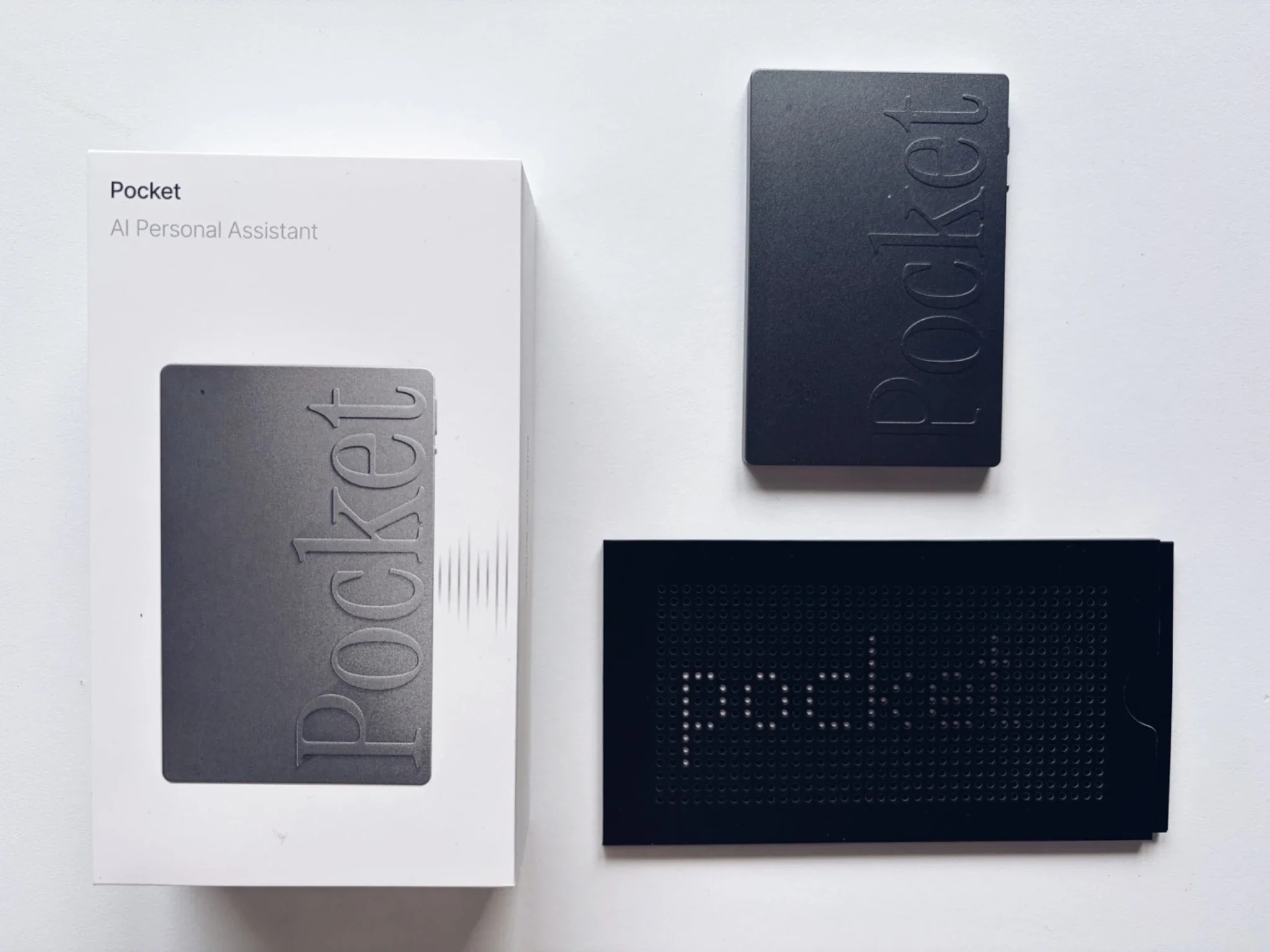
First Impressions: An Unboxing Experience Done Right
I rarely spend much time discussing packaging in my technology reviews, but Pocket deserves a mention here.
There is a minimalist, almost Scandinavian feel to the entire presentation. It is clean, understated and beautifully considered.
Having previously unboxed both the Plaud Note and the Comu Action Pro, I can comfortably say that Pocket offers my favorite unboxing experience of the three.
What I particularly appreciate is the consistency. The packaging, the device itself and even the app all share the same design philosophy.
It feels like a product where the design team has been involved in every stage of the experience, rather than simply designing a piece of hardware and leaving everything else to another department.
It makes a very good first impression.
Design and Build Quality: The Best-Looking AI Recorder I've Tested
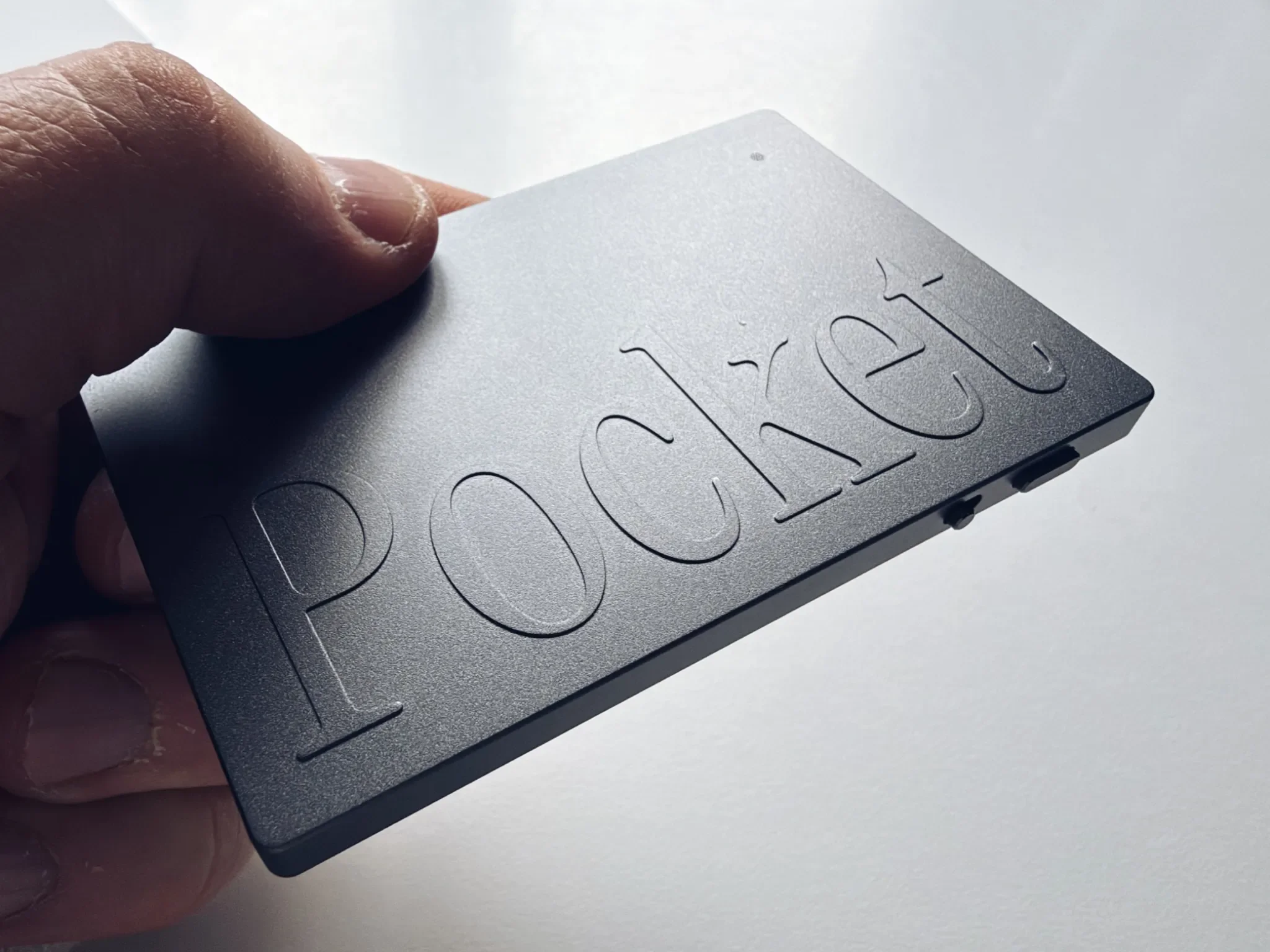
The industrial design, textured finish and reassuring weight make Pocket feel like a genuinely premium piece of technology.
Pocket has a slightly square, industrial design that I really like.
It feels sturdy, substantial and extremely well made. There is nothing particularly fragile or cheap about it, and it has the reassuring weight of a premium piece of technology.
The Plaud Note is noticeably thinner, which might be preferable if you want something as discreet as possible attached to your smartphone. Personally, I actually enjoy the extra weight and thickness of Pocket. It gives the device a little more character.
Pocket is also MagSafe compatible, making it particularly convenient for iPhone users. Attaching it to the back of my phone feels natural, especially when using it to record phone conversations.
Of the AI recorders I have tested, Pocket is the one I find most visually appealing. Design is subjective, of course, but for me, Pocket gets it right.
Setup and App Experience
The good first impression continues when you set up the device.
The Pocket app follows the same minimalist approach as the hardware and packaging. Everything feels connected, both visually and in terms of the overall user experience.
Getting started is straightforward, and there is very little about the app that feels unnecessarily complicated.
One of the challenges with AI products is that manufacturers often try to demonstrate how much their software can do. The result can sometimes be an overwhelming interface filled with features that many people will rarely use.
Pocket takes a different approach.
The app is clean, responsive and easy to navigate. I don't think it is quite as advanced as the Plaud app, but I don't necessarily see that as a disadvantage. Simplicity is clearly at the heart of the Pocket experience, and for everyday use, it works very well.
What Can You Actually Do With Pocket?
Pocket is designed to capture information from the real world and make it easier to organize and access later. You can record meetings, phone calls, conversations and personal voice notes, and the app can then generate transcriptions, summaries and action items. There are also different summary templates, calendar integration and connections with other productivity applications.
For someone managing a business, attending regular meetings or working with multiple clients, these features could be particularly useful.
My own use of Pocket, however, has been slightly different.
As a full-time blogger, I am constantly thinking about new articles, products I am reviewing and ideas for future content. Some of my best ideas come when I am nowhere near my computer, particularly when I am out walking Marlow, my dog. Being able to record those thoughts and have them transformed into something more organized is one of the things I enjoy most about this type of device.
Over the past month, I have also used Pocket to record a business meeting and several telephone conversations with my wife and children to test its recording and transcription accuracy.
Of course, before recording any conversation or telephone call, make sure you understand your local privacy laws and consent requirements.
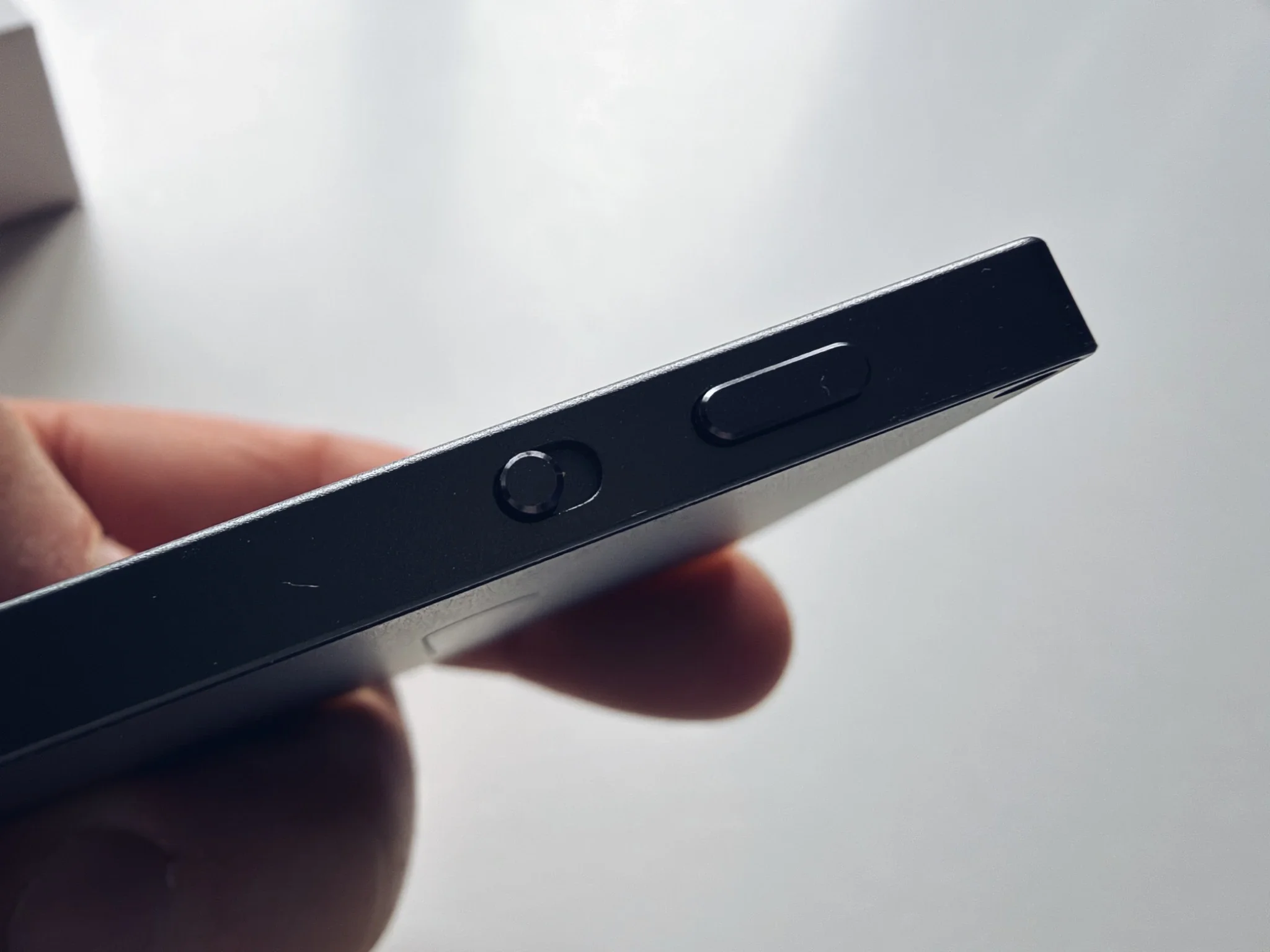
Simple physical controls reflect Pocket's focus on ease of use and everyday convenience.
Recording Quality and Transcription Accuracy
This is an area where Pocket has genuinely impressed me.
I have used the device both indoors and outdoors, and the quality of the recordings has been consistently good. Even when recording my thoughts during a walk, I haven't experienced any significant problems with audio quality.
But recording quality is only part of the equation. For an AI note-taking device, transcription accuracy is arguably even more important.
English is not my first language, and despite having lived in the UK for many years, I still have a noticeable French accent. That can occasionally be an issue with voice recognition technology.
Pocket handled my accent extremely well. During my testing, it understood what I was saying and produced remarkably accurate English transcriptions. This is something that matters to me personally, but it is also worth highlighting for anyone who regularly communicates in a language that isn't their native one.
Based on my experience, I have very little to criticize when it comes to Pocket's core recording and transcription capabilities.
AI Summaries: Useful, but Not Always Instant
The quality of the summaries has also been very good.
Pocket does a good job of taking a conversation and presenting the important information in a more structured and readable format. This is particularly useful when recording a meeting or simply talking through some ideas for an article.
The summaries aren't always generated as quickly as I would like, but processing takes place in the background, so it hasn't been a major inconvenience.
There is also a wide selection of templates and integrations available, depending on your subscription and how you intend to use the device. Personally, these aren't the features I am most interested in. My main reason for using Pocket is to capture ideas, remember conversations and retrieve useful information when I need it.
And that brings me to one of Pocket's most interesting features.
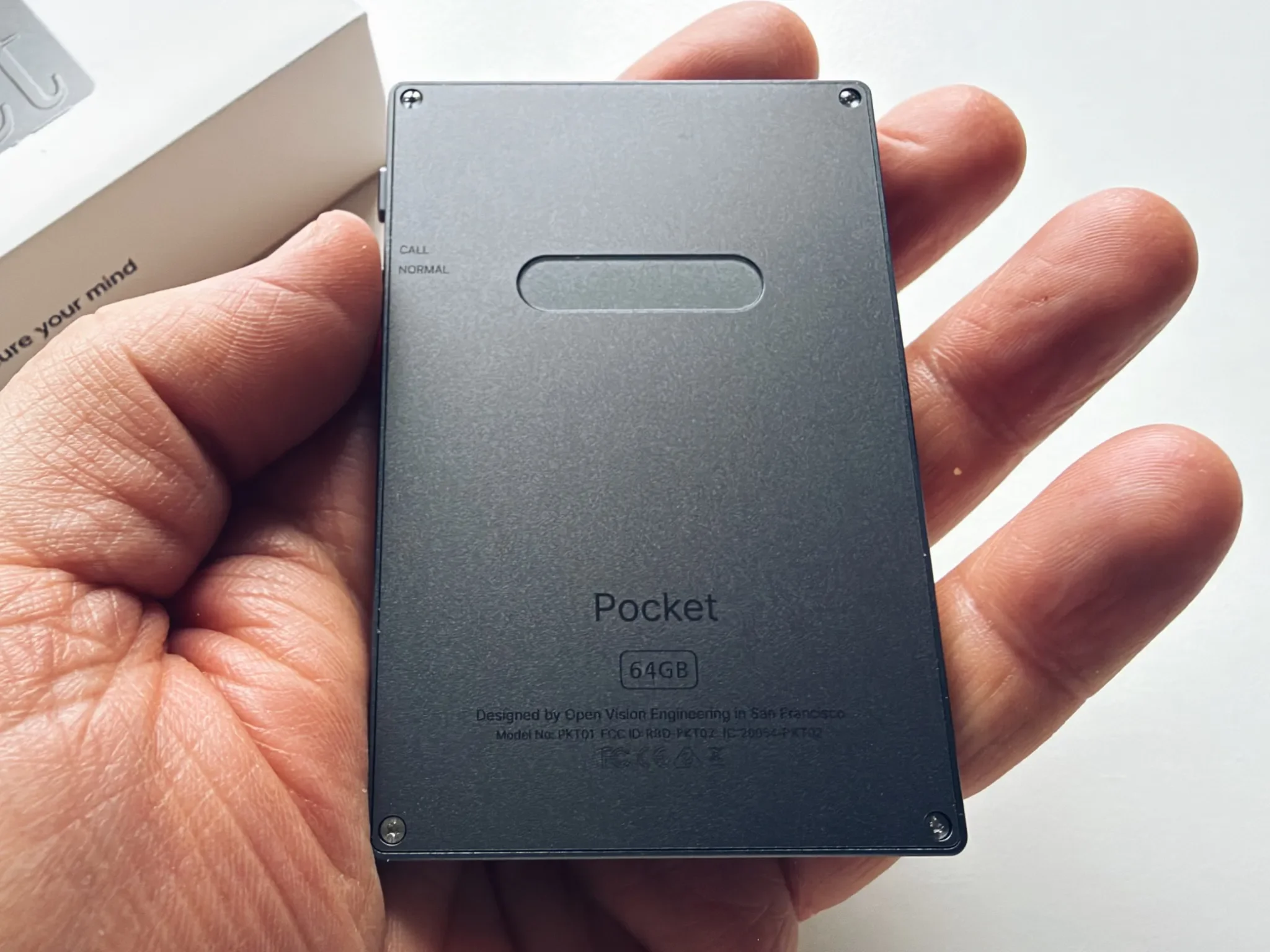
Pocket features 64GB of onboard storage and dedicated modes for recording conversations and phone calls.
Ask Pocket: Brilliant in Theory, Sometimes Frustrating in Practice
Ask Pocket is essentially an AI assistant built into the app. It gives you access to AI models, including ChatGPT, and allows you to ask general questions or search for information from your previous recordings.
When it comes to general questions, the experience can be excellent. For example, I asked Ask Pocket for some ideas for a perfect Thanksgiving. It came back almost instantly with some genuinely good suggestions.
However, what interests me more is the ability to retrieve information from my own conversations. After all, that is one of the main reasons to have a dedicated personal AI assistant.
Unfortunately, my experience here was a little more mixed.
A real example from my testing
The previous day, I had recorded a telephone conversation with my daughter about her driving home from college.
Pocket had recorded the conversation perfectly and generated an excellent summary.
The following day, I asked Ask Pocket about that conversation.
It couldn't find it.
I provided some additional information, but it still couldn't retrieve the conversation. After another attempt, I reached the free plan's limit for that chat and was prompted to subscribe. The free plan I was using allowed up to three messages per chat, and it's a genuinely restrictive limit when you're trying to find something specific.
I started a new conversation, this time providing the specific date and explaining that the conversation was between myself and a child. I used the word child because that was how the other speaker had been identified in the original summary.
This time, Pocket found the conversation.
The problem is that I shouldn't really have needed to provide that level of detail.
What I would expect from a personal AI assistant is a response along these lines:
"I found a conversation from yesterday between you and a child about driving home. Could this be the conversation with your daughter?"
That would feel intelligent. It would demonstrate an ability to connect information, understand context and ask a relevant follow-up question.
Instead, I had to adapt my questions to match the way Pocket had categorized the conversation.
It is an important distinction.
Pocket is very good at recording, transcribing and summarizing information, but retrieving that information in a natural, conversational way still needs some improvement. The concept is excellent. I would simply like to see the execution become a little more intelligent.
Battery Life and Charging
I have very little to complain about here.
Battery life has been solid throughout my month of testing, and I haven't encountered any significant issues in everyday use.
I particularly appreciate the USB-C charging port. It might seem like a relatively minor detail, but when you regularly test technology and already have numerous cables and accessories around your desk, being able to use a standard USB-C cable makes life considerably easier.
No complaints from me in this department.
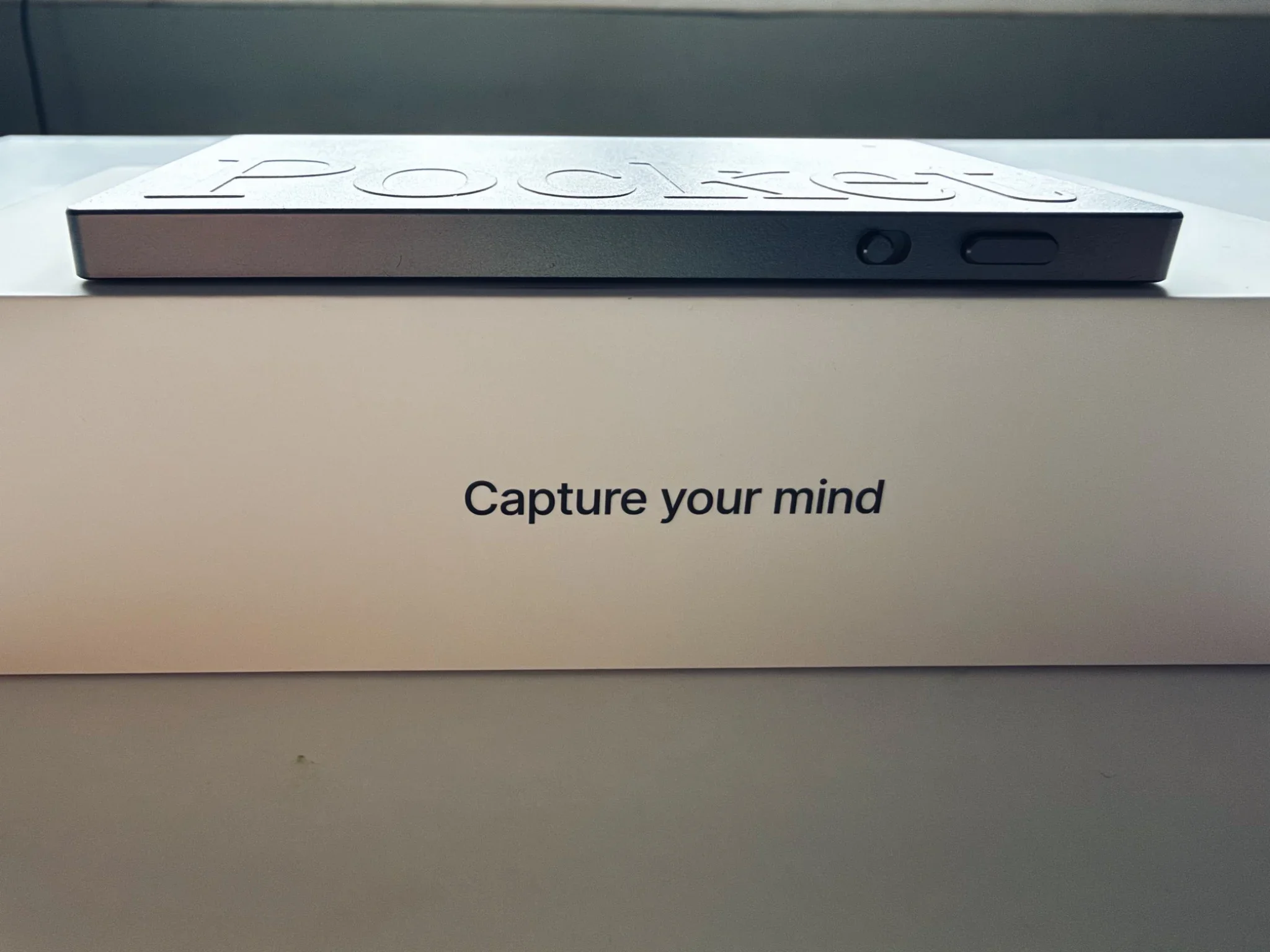
Side profile of the Pocket AI personal assistant resting on its Capture your mind retail box, showing its compact design and physical controls.
Pocket Pricing: Free vs Pro Subscription
This is probably one of the most important sections of this review if you are considering buying Pocket.
The good news is that you can use the device without paying for a subscription. Standard transcriptions and summaries are available on the free plan.
However, there are some limitations.
Summaries are retained for 30 days on the free plan, while permanent summary retention is available with Pocket Pro. Access to Ask Pocket is also restricted. During my testing, I was limited to three messages per chat. In practice, that's not much at all, especially if you're trying to retrieve something specific and the first couple of attempts don't work.
Pocket Pro is advertised at $19.99 per month, with the billing terms depending on the offer selected. At that rate, you are looking at approximately $240 per year, in addition to the initial cost of the device.
For a professional who spends several hours every day in meetings, manages numerous projects or regularly needs access to previous conversations, I can understand the value of the subscription. If Pocket saves you a considerable amount of time every week, the cost might be relatively easy to justify.
But for someone like me, who mainly wants to capture thoughts, record occasional meetings and access a personal AI assistant when needed, the decision is a little more complicated.
What disappointed me during my testing was reaching the free plan's limit while trying to retrieve a conversation that Pocket had already recorded and summarized. I wasn't asking the AI to complete a particularly demanding task. I was simply trying to find something from the previous day.
I understand that AI processing costs money and that Pocket needs a sustainable business model. However, I would like to see a slightly more generous free plan, particularly for retrieving information from previous recordings.
Privacy and Data Security
Privacy is an important consideration when choosing any AI voice recorder. These devices can potentially capture sensitive business information, personal conversations and confidential details. Understanding how that information is processed, stored and protected matters.
Pocket provides information about encrypted storage, secure cloud synchronization and other security measures.
However, I would like to see more detailed and accessible documentation regarding its security practices and independent certifications. Plaud, for example, publishes information about its ISO/IEC 27001 and ISO/IEC 27701 certifications, covering information security and privacy management.
For individual users, entrepreneurs and smaller businesses, Pocket's documented security measures may be sufficient depending on the nature of the information being recorded. For larger organizations with strict security and compliance requirements, I would currently be more inclined to recommend evaluating Plaud.
This doesn't mean that Pocket is insecure. Rather, I find Plaud's publicly documented security credentials more reassuring when dealing with sensitive corporate information.
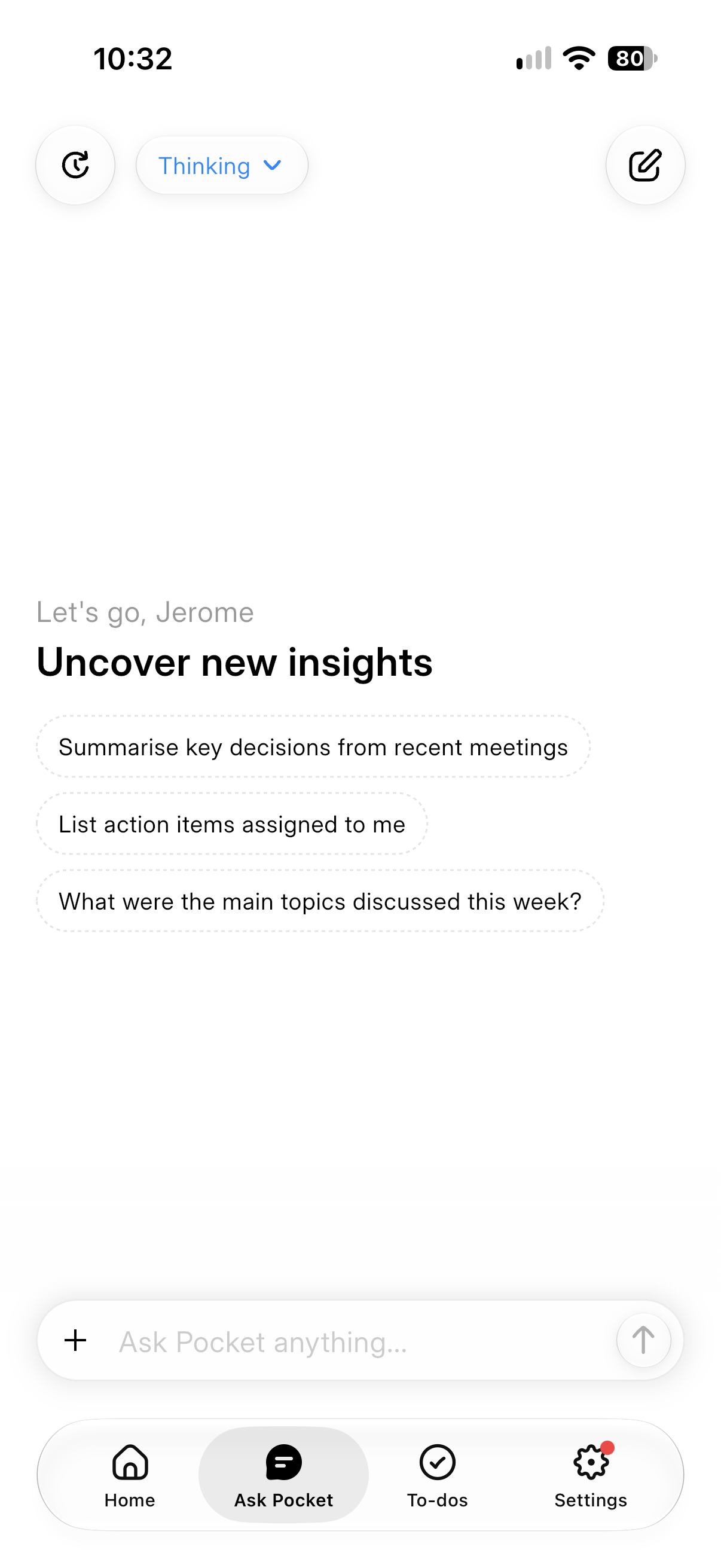
The app is clean and beautiful
Pocket vs Plaud Note vs Comu Action Pro
Having tested all three devices, I find that each appeals to a slightly different type of user.
Pocket is my favorite in terms of design and simplicity. The hardware is beautiful, the app is approachable, and recording and transcription quality are excellent. Its biggest limitation for me is the free plan.
Plaud Note feels like the more mature professional solution. It is thinner, offers a more developed software ecosystem and has more extensively documented security credentials. For larger businesses, I think it remains a particularly compelling option.
Comu Action Pro is worth considering if you are looking for a device primarily for everyday note-taking and occasional AI assistance. Its free plan includes unlimited standard transcription and basic summarization, and I personally find its free offering more attractive for my needs.
So, to put it simply: if privacy documentation is your priority, Plaud. If design and simplicity are your priority, Pocket. If free plan generosity is your priority, Comu. There isn't one device that is better for everyone, but that's roughly how the three split.
Who Should Buy Pocket?
I think Pocket makes the most sense for entrepreneurs, consultants, content creators and professionals who regularly capture ideas or need to remember important conversations.
If you appreciate good design and want an AI recorder that is genuinely easy to use, Pocket is particularly appealing.
I can also see it working very well for people who are relatively new to AI technology. The simplicity of the app makes the experience far less intimidating than some more complicated productivity platforms.
However, if you only intend to record occasional meetings or personal voice notes and want to avoid another monthly subscription, I would recommend carefully comparing the available free plans before making your decision. The price of the hardware is only one part of the overall cost.
Final Verdict: Is Pocket Worth Buying?
After a month of using Pocket, there is a lot about this device that I genuinely like.
The design is beautiful, the build quality is excellent, and the simplicity of the app makes it a pleasure to use. Recording quality and transcription accuracy have also been consistently impressive.
I think the team behind Pocket has done an excellent job of creating a product with a distinctive identity in an increasingly competitive market.
My reservations are primarily related to the software rather than the hardware. Ask Pocket has tremendous potential, but I would like to see improvements in the way it understands context and retrieves information from previous conversations. I also think the free plan could be more generous.
If you are a power user and are comfortable paying for Pocket Pro, I think you will find a beautifully designed, capable and enjoyable AI note-taking device. For entrepreneurs, content creators and small business owners, the subscription could make a lot of sense.
For larger organizations handling sensitive or confidential information, however, I would not currently recommend Pocket without a thorough security and compliance review. While Pocket provides information about its security measures, I could not find publicly documented ISO/IEC 27001 or ISO/IEC 27701 certifications. For organizations where these certifications are important, Plaud remains my preferred choice.
For more occasional users, I would carefully consider the limitations of the free plan before buying.
Would I recommend Pocket as a personal AI note-taker? Yes. The hardware is excellent, the app is beautifully designed, and the recording and transcription quality are among the strongest I have experienced.
I just wish the free plan allowed more people to appreciate everything that makes Pocket such an interesting product.
Jerome

After a month of testing Pocket AI, I share my experience with its premium design, recording quality, AI summaries, personal assistant and subscription plans.